
Client Tweaks
modThere, I fixed Minecraft for you. Various optional tweaks to improve Minecraft Quality of Life.
byBlayTheNinth
10M
971
Compatibility
Supported Loaders
fabricforgeneoforge
Game Versions
Gallery
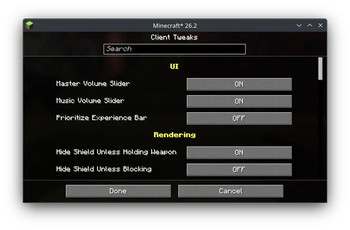
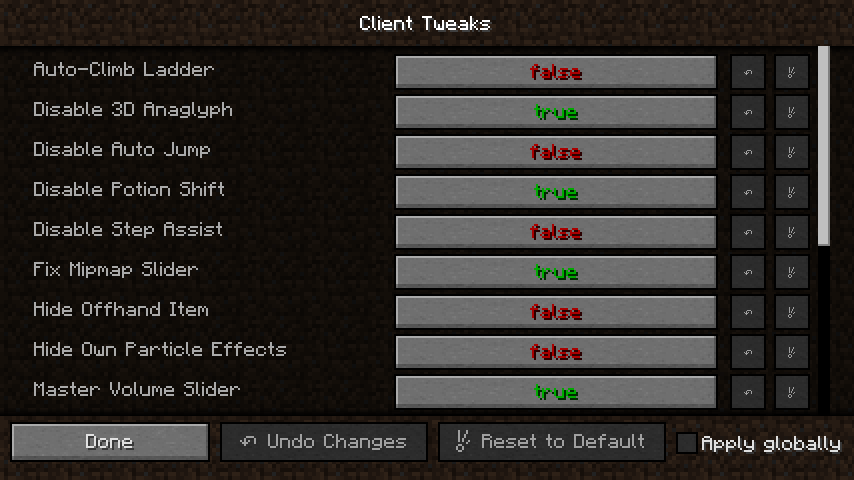
Client Tweaks Settings
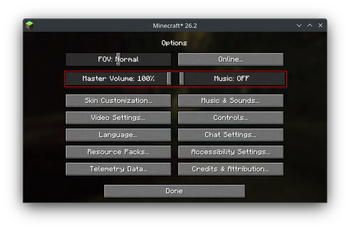
Audio Sliders
There, I fixed Minecraft for you. Various optional tweaks to improve Minecraft Quality of Life.
Client Tweaks Settings
Audio Sliders
Good news everyone, I've found the secrets to fixing your Minecraft experience. I've bundled them in this mod.
This mod adds a bunch of optional tweaks to improve the Quality of Life during gameplay. Tweaks can be individually enabled or disabled and configured. Many of the tweaks are disabled by default, so make sure to enable the features you want for the most bestest experience possible.
This mod requires Balm, which must be installed alongside the mod.
To access the config screen on Fabric, install a supported config screen mod.

Adds the Master Volume slider back to the main options screen. Saved you a click.
Adds the Music slider back to the main options screen too, because sometimes the music is the thing you wanted to change after all.
Prioritizes the experience bar info over the locator bar. Can be toggled with a keybind if you care about both.
Prevents shields from rendering in your offhand unless you are holding a weapon.
Prevents shields from rendering in your offhand unless you are actively blocking.
Prevents the item in your offhand from rendering, in case you hate seeing what you're holding. This can be toggled by a keybind too, in case you only hate seeing what you're holding sometimes.
Hides your empty main hand in first person. Who needs an unused hand anyways?
Hides all of your hands regardless of whether they hold an item. This can be toggled by a keybind.
Hides your own potion effect particles in first person. Other players will still see them normally.
Hides your own potion effect particles in third person as well. Other players will still see them normally.
I often make really long ladders down to my mine, and it's a pain having to hold down a key the whole time while climbing back up. With this tweak on, you will continue to climb upwards as long as you look upwards while on a ladder. That means you can type in chat and do other things without instantly falling back down and losing all of your progress on the long journey.
There's people who hate step assist, but sometimes those step-assist granting items add some other cool perks that we want. So this option lets you disable the step-assist part only. With optional keybind to toggle.
Makes sprinting stop when the sprint key is released or sprinting is toggled off. Combine with a fan blowing at you for full immersion.
Prevents tools with Mending from using their last point of durability. You're safe now, Pickaxe of Doom.
Prevents accidental mining of certain fragile blocks like budding amethysts unless you are holding shift.
Increases the hitbox of iron fences and glass panes when you're holding a matching block, making it easier to place them against each other.
Increases the hitbox of chains when you're holding a chain block, making it easier to place them against each other.
Disables log stripping outright. Useful when you build using wood and have an axe-like tool in your hand a lot to prevent accidental strippings. Can be toggled with a keybind.
Only allows log stripping while holding shift, so accidental right-clicks do not remodel your walls.
Prevents shovels from creating paths when you have a block in your offhand.
Prevents items from being used from your offhand while you have food in your main hand.
Prevents fireworks from being launched from your offhand if you are wearing an Elytra, unless you're already flying.
Prevents sweet berries from being placed unless you are holding shift.
This option is useful when using a mod adding dynamic lights. The last torch in your offhand will not be placeable, so you always have a light to carry around with you.
Completely disables placing torches from your offhand. Useful if you only carry a torch in your offhand for things like dynamic lighting.
Refuses to place a torch if you're holding a block in your main hand. Because there's no way you intended to place a torch in that case. Something was just standing in the way of the spot you wanted to place that block in but the torch was fitting since it's smaller. Fixed it for ya.
Prevents you from placing a torch from your offhand when you have food in your main hand. Begone, ceremonial post-lunch torch.
You know that feeling when you're tired, try to open the chest but misclicked the block next to it? And of course you still had a torch in your offhand. And of course it placed it. And now you have to break it again. Ugh. This option only allows torches to be placed when your main hand is not empty.
This is the option I consider best, but it changes vanilla behavior too much to be the default. This will only allow placing torches from the offhand when you're holding a tool. No more accidental torch placement, ever again.
Increases the hitbox of random-offset blocks in creative mode, making it easier to break them quickly.
Makes right-clicking the creative menu search bar clear it, like most other text fields do.
Keeps your creative menu search text when reopening the creative search tab.
Prevents the recipe book from shifting the inventory when opened. Works best with smaller GUI scales and bigger resolutions.
Makes right-clicking the recipe book search bar clear it, like most other text fields do.
Lets you click ghost ingredients in the crafting grid to navigate to their recipe in the recipe book. Backspace returns to the previous recipe. Or in short, your recipe book is JEI-ish now.
Keeps your recipe book search text when reopening the recipe book.